
Picking a web host feels like a small decision until it isn’t. Six months into running a site on the wrong provider, you’re dealing with slow load times, a support ticket that’s been sitting untouched for two days, and a renewal invoice that’s three times what you originally signed up for. That experience is exactly why Hostinger keeps coming up in conversation — it built its entire reputation on promising you won’t have to go through that.
But “cheap and popular” doesn’t automatically mean “right for you.” In this review, I’m breaking down where Hostinger actually delivers in 2026, where it falls short, how it stacks up against Bluehost and SiteGround, and who should probably look elsewhere entirely.

What Is Hostinger, Exactly?
Hostinger is a Lithuania-founded web hosting company that now serves millions of websites across more than 10 global data centers. It offers shared hosting, WordPress-specific hosting, cloud hosting, and VPS plans, all managed through its own custom-built control panel called hPanel rather than the industry-standard cPanel most competitors use.
The company built its brand on one simple pitch: hosting that’s fast enough for serious use and priced low enough for beginners. That combination is rare — most hosts pick one lane or the other — and it’s the main reason Hostinger shows up near the top of nearly every “cheap hosting” list on the internet.
Core Features, Explained With Real Examples
hPanel: The Control Panel
Instead of the cluttered, dated-looking cPanel interface, Hostinger built hPanel from scratch. In practice, this means when you log in, you see your CPU, RAM, and bandwidth usage front and center — no digging through menus. Say your blog post suddenly goes viral on Reddit; instead of guessing why your site slowed down, you can check hPanel’s resource graph immediately and see if you’re bumping against your plan’s limits.
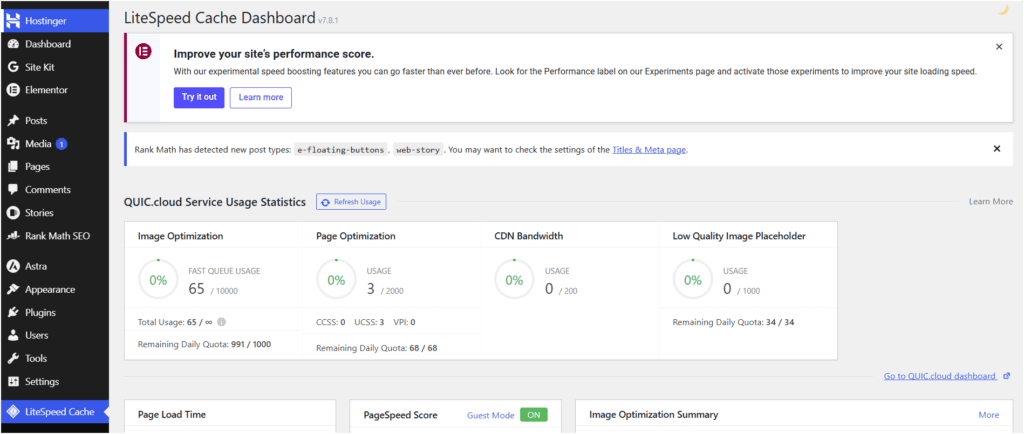
NVMe SSD Storage and LiteSpeed Servers
Hostinger runs on NVMe SSDs, which are significantly faster than the older SATA SSDs many budget hosts still use, paired with LiteSpeed web servers and caching. For a practical example: a WordPress blog with 20-30 image-heavy posts will typically load in under a second on Hostinger’s Business plan, compared to two or three seconds on hosts still running standard Apache setups.
Free CDN and Daily Backups
On business plans and above, you get a free content delivery network and automated daily backups. If your site is hit by a bad plugin update or accidental file deletion, you can roll back to yesterday’s backup instead of rebuilding from scratch — something that would cost extra on several competing hosts.
AI Website Builder and AI Tools
Hostinger’s AI builder lets you generate a full site—layout, images, and starter copy—by answering a few questions about your business. It’s not going to replace a designer for a complex project, but for a local service business that just needs a clean five-page site up by Friday, it genuinely works.

WordPress-Specific Optimization
Managed WordPress hosting includes WP-CLI access, staging environments on higher tiers, and one-click WordPress installs. If you’re migrating an existing WordPress site, Hostinger’s built-in migration tool can pull your site over from another host without needing a developer.
Migration and Onboarding
If you’re already hosting a site elsewhere, switching providers is usually the part people dread most. Hostinger’s migration wizard handles most of the heavy lifting — you provide your current site’s login credentials or a backup file, and the system copies your files, database, and settings over automatically. For straightforward WordPress sites, this typically takes under an hour. More complex, custom-built sites may need a bit of manual cleanup afterward, but you won’t need to touch a terminal to get the bulk of it done.
Customer Support Channels
Support is available through 24/7 live chat, along with an extensive knowledge base covering everything from DNS setup to email configuration. There’s no phone support, which is worth knowing if you prefer talking through an issue rather than typing it out. Response times are generally quick for account and billing questions, though more technical server-level issues can take longer to fully resolve — a common pattern across budget hosts, not just Hostinger.
Security Features
Every Hostinger plan includes a free SSL certificate, which used to be an upsell at many hosting companies but is now table stakes across the industry. Beyond that, Hostinger layers in automated malware scanning and removal, a basic firewall, and DDoS protection at the network level. On Business plans and up, you also get daily automated backups plus the option to trigger an on-demand backup before making risky changes, like a major theme update.
For context: if you run a small online store and a plugin vulnerability gets exploited overnight, the malware scanner typically flags suspicious files within hours rather than leaving you to discover the problem when a customer reports a broken checkout page.
Real-World Performance: What Testing Actually Shows
Marketing pages love to say “blazing fast,” but what does that mean in practice? Independent 2026 benchmarking (using tools like GTmetrix and WebPageTest against identical WordPress test sites) puts Hostinger’s average Time to First Byte in the 220–400ms range on Business and Cloud plans — competitive with SiteGround and noticeably ahead of several legacy budget hosts still running older Apache-based infrastructure. Uptime across the same testing period sat close to 99.9%, which lines up with what most long-term Hostinger customers report anecdotally.
The practical impact of this is straightforward: faster load times reduce bounce rate, which matters both for user experience and for Google’s page experience signals in search rankings.
Hostinger Pricing in 2026
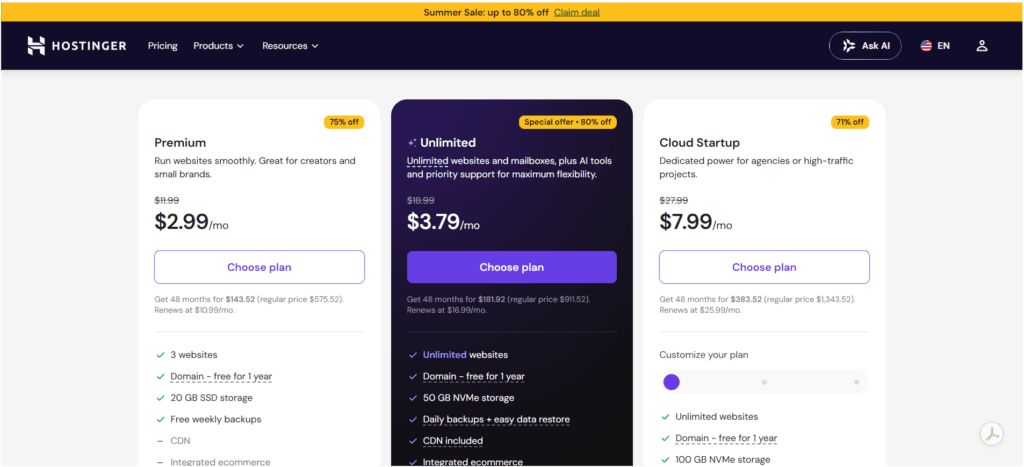
| Plan | Best For | Starting Price (Long-Term) | Renewal Price |
|---|---|---|---|
| Premium Shared | Single site, beginners | ~$2.69–$2.99/month | ~$8.99/month |
| Business Shared | Up to 50 websites, growing blogs | ~$3.29/month | ~$10.99/month |
| Cloud Startup | High-traffic sites, dedicated resources | Higher-tier pricing | Varies by term |
| VPS (KVM) | Developers, custom applications | From ~$5–$8/month | Varies by plan |
The catch that every honest review needs to mention: those headline prices require paying upfront for a long commitment, often 24 to 48 months. Once that term ends, your monthly cost jumps — commonly landing between $8.99 and $11.99/month depending on the plan. Domain renewals follow a similar pattern; a .com might cost $1–$9.99 in year one, then renew around $13–$15/year.
This isn’t unique to Hostinger — most budget hosts use this pricing structure — but it’s worth calculating your true 3-year cost before comparing hosts on sticker price alone.
Benefits
- Genuinely fast performance for the price — sub-400ms average load times in independent testing
- Beginner-friendly hPanel with a shallow learning curve
- Feature-rich by default — free CDN, backups, malware scanning, and analytics are built in rather than upsold as add-ons
- Flexible scaling path — moving from shared to cloud or VPS hosting doesn’t require switching providers
- Global data center coverage, which helps with latency if your audience isn’t purely US-based
Drawbacks
- Renewal price jump — the biggest complaint across nearly every review, including this one
- Support quality is inconsistent—live chat response times can vary, and some users report longer resolution times on complex issues
- No fully managed VPS option — you’re on your own for server administration at that tier
- Reputation concerns—Hostinger has faced public criticism over past incentivized/fake review practices, which is worth knowing even though the product itself has genuinely improved
- Not built for enterprise-scale traffic — high-traffic e-commerce or media sites will eventually outgrow shared and even cloud tiers
Hostinger vs. Bluehost vs. SiteGround
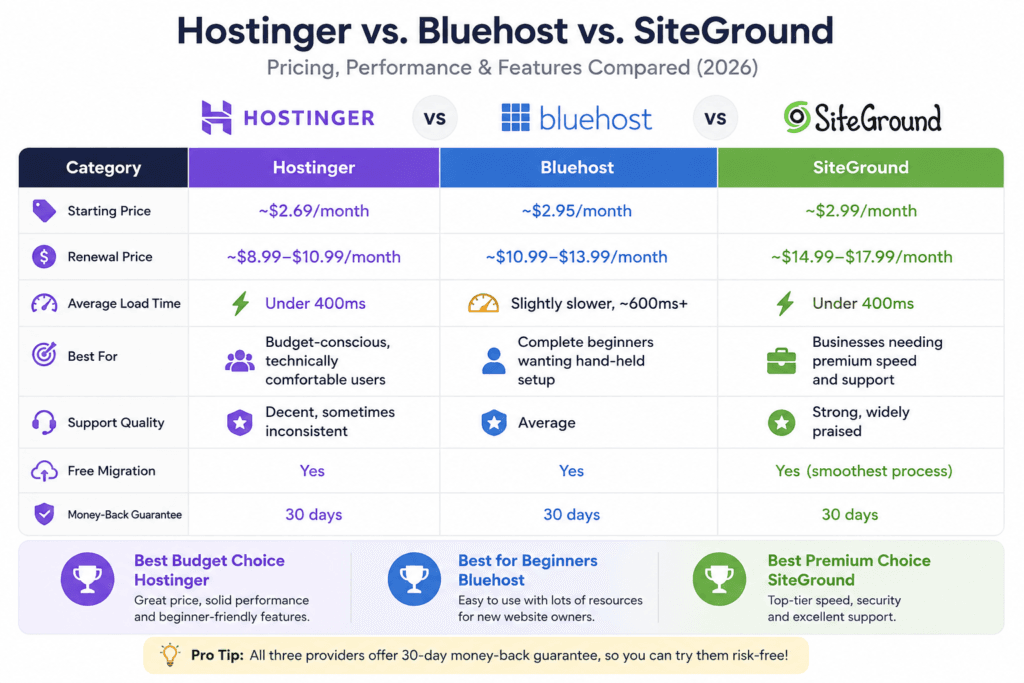
| Category | Hostinger | Bluehost | SiteGround |
|---|---|---|---|
| Starting Price | ~$2.69/month | ~$2.95/month | ~$2.99/month |
| Renewal Price | ~$8.99–$10.99/month | ~$10.99–$13.99/month | ~$14.99–$17.99/month |
| Average Load Time | Under 400ms | Slightly slower, ~600ms+ | Under 400ms |
| Best For | Budget-conscious, technically comfortable users | Complete beginners wanting hand-held setup | Businesses needing premium speed and support |
| Support Quality | Decent, sometimes inconsistent | Average | Strong, widely praised |
| Free Migration | Yes | Yes | Yes (smoothest process) |
| Money-Back Guarantee | 30 days | 30 days | 30 days |
The honest takeaway from most independent 2026 testing: Hostinger and SiteGround are essentially tied on raw speed, but SiteGround charges a steep premium for its support quality — its renewal price can jump over 500% from the promotional rate. Bluehost trades speed for a more guided setup experience, which matters if you’ve genuinely never built a website before.
If you want the fastest site at the lowest long-term cost and you’re comfortable troubleshooting minor issues yourself, Hostinger wins. If support responsiveness is non-negotiable for your business, SiteGround is worth the extra spend. If you want the most hand-held beginner experience, Bluehost still has an edge.
Who Should Use Hostinger?
- First-time website owners who want an affordable, low-friction starting point
- Bloggers and content creators publishing regularly and prioritizing speed and SEO-friendly load times
- Small business owners who need a professional site without enterprise-level costs
- Freelancers and agencies managing several client sites who need to scale plans easily
- WordPress users who want built-in staging, backups, and optimization without extra plugins
Who Should Avoid Hostinger?
- High-traffic e-commerce stores that need guaranteed uptime SLAs and dedicated resources
- Businesses where support response time directly affects revenue—SiteGround or a managed host is a safer bet
- Users who want fully managed VPS with a provider handling server maintenance for you
- Anyone allergic to long-term contracts —if you want month-to-month flexibility without a renewal price shock, look at hosts with flat, predictable pricing instead
Frequently Asked Questions
1. Is Hostinger good for beginners? Yes. The hPanel dashboard is simpler than traditional cPanel, and the onboarding flow walks new users through domain setup, WordPress installation, and basic configuration without requiring technical knowledge.
2. Does Hostinger offer a free domain? Most annual and long-term plans include a free domain for the first year. After that, it renews at standard market rates, typically $13–$15/year for a .com.
3. How does Hostinger’s uptime compare to competitors? Independent 2026 testing shows Hostinger consistently delivering close to 100% uptime, on par with SiteGround and ahead of several budget competitors.
4. Can I upgrade my Hostinger plan later without migrating? Yes. You can move from shared hosting to cloud or VPS hosting within Hostinger’s own ecosystem without needing to transfer your site to a different provider.
5. Is Hostinger’s customer support available 24/7? Yes, live chat support is available around the clock, though response times and resolution quality can vary depending on the complexity of the issue.
6. Does Hostinger work well for e-commerce sites? For small to mid-sized stores, yes — especially on Business or Cloud plans. For large-scale e-commerce with heavy traffic spikes, a dedicated e-commerce host or higher-tier managed solution is usually a better fit.
7. What happens to my pricing after the promotional period ends? Your plan renews at the standard rate, which is meaningfully higher than the promotional price — often $8.99 to $11.99/month depending on your plan. It’s worth setting a reminder before your renewal date so you’re not caught off guard.
8. Is Hostinger better than Bluehost for WordPress hosting? In most independent speed tests, yes — Hostinger tends to load faster. Bluehost, however, offers a more guided setup experience, which may matter more if you’ve never built a WordPress site before.
Final Verdict
Hostinger earns its reputation honestly in most categories that matter: it’s fast, it’s affordable, and it doesn’t nickel-and-dime you for features that competitors charge extra for. The renewal pricing jump is real and worth planning around, and if rock-solid customer support is your top priority, SiteGround is worth the extra cost. But for the vast majority of bloggers, freelancers, and small business owners looking for a reliable place to launch a website in 2026, Hostinger remains one of the smartest budget picks on the market — as long as you go in with your eyes open about what happens after year one.
Suggested external resources
Affiliate disclosure reminder: If any links above are affiliate links, add a clear disclosure statement near the top of the article per FTC guidelines and Google AdSense policies.
