
Picking the best chatbots for customer service shouldn’t mean wading through twenty tabs of pricing pages and vague “AI-powered” marketing copy. Most small business owners just want a bot that answers real customer questions, doesn’t cost a fortune, and can go live without a developer. This guide compares seven tools that actually deliver on that promise in 2026, based on what small teams need most: fast setup, honest pricing, and support automation that doesn’t feel robotic.
What to Look for in the Best Chatbots for Customer Service
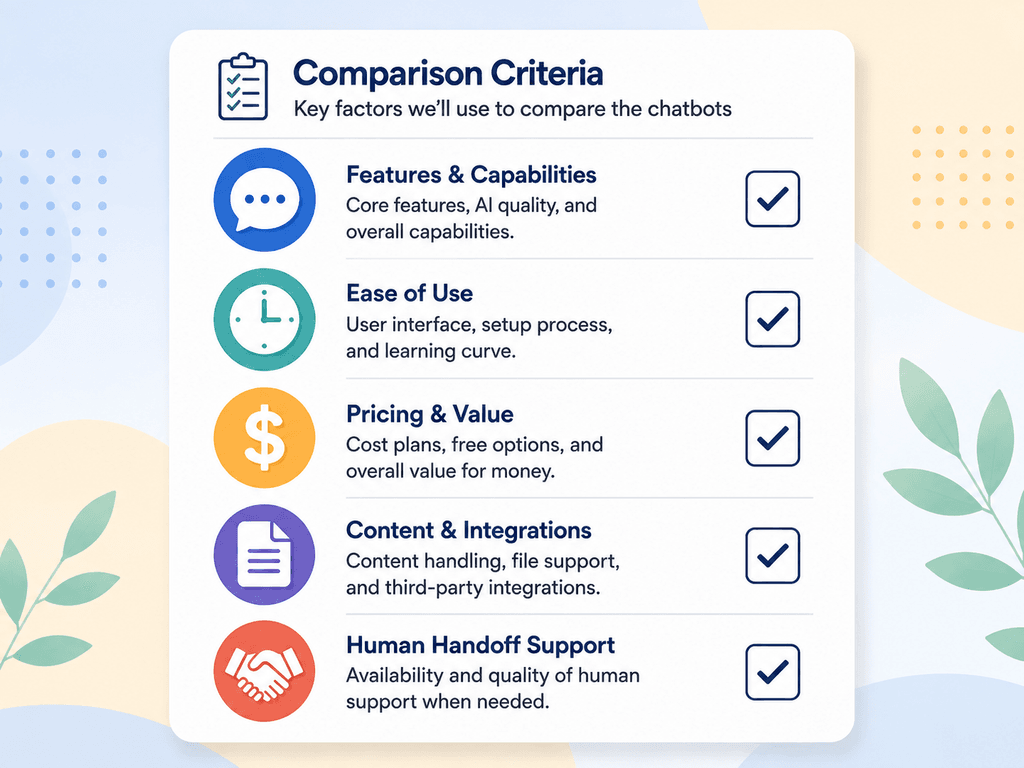
Before comparing tools, it helps to know what actually separates a good customer service chatbot from a frustrating one.
- Resolution rate — how many conversations the bot handles end-to-end without a human
- Setup time — whether you need a developer or can launch it yourself in an afternoon
- Pricing structure — flat monthly fee vs. per-conversation or per-resolution billing, which can get expensive fast
- Knowledge base training — can it learn from your existing FAQs, help docs, or website content
- Human handoff — how smoothly it passes a frustrated customer to a real person
- Channel coverage — website chat only, or also email, SMS, and social messaging
Best Chatbots for Customer Service at a Glance
| Tool | Best For | Price | Key Feature | Main Limitation |
| Tidio | Small budgets, fast setup | Free; paid from ~$24/mo, Lyro AI add-on from ~$32.50/mo | Live chat + AI chatbot in one dashboard | AI billed as a separate add-on, gets pricey at scale |
| Zendesk AI Agents | Teams already using Zendesk | Suites from $19–$115/agent/mo, plus ~$1–$2 per AI resolution | Deep ticketing and reporting integration | AI resolutions billed separately on top of seats |
| Intercom Fin | Highest reported resolution rates | Usage-based, priced per resolution | Fast, accurate answers with minimal FAQ setup | Now being folded into Salesforce Agentforce after acquisition |
| HubSpot Chatflows/Breeze | Businesses already on HubSpot CRM | Chatflows free; Breeze AI agent needs Professional ($90/seat/mo)+ | Native CRM data personalizes every chat | AI chatbot locked behind higher-tier plans |
| Freshdesk (Freddy AI) | Freshworks users wanting native automation | Plans from $15/agent/mo | Ticket classification plus chatbot in one suite | Full AI features reserved for higher tiers |
| Chatbase | Custom bots trained on your own content | Flat monthly plans, budget-friendly tiers | Trains directly on your docs, website, and knowledge base | Fewer built-in helpdesk features than full platforms |
| Ada | Multilingual, no-code support | Custom pricing | Handles complex, multilingual conversations at scale | Better suited to larger support volumes than solo shops |
The 7 Best Chatbots for Customer Service in 2026
1) Tidio (Lyro AI)
Tidio combines live chat, a rule-based chatbot builder, and its Lyro AI agent in one dashboard, which makes it one of the easiest ways for a small team to start automating support this week. The free plan includes 50 monthly conversations and a one-time pool of 50 Lyro AI conversations, enough to test whether AI support fits your workflow before paying anything.
Where it gets tricky is scaling: Lyro is billed as a separate meter from the base plan, so a small store that outgrows the free tier can end up paying for live chat, chatbot automation, and Lyro conversations as three different line items. Budget carefully once you move past testing. Visit the Tidio official website
Best for: Small e-commerce shops and solo founders who want to try AI chat without committing to a big contract.
2) Zendesk AI Agents
If you’re already running Zendesk for ticketing, its AI Agents feature is worth testing before you bring in a separate chatbot tool. It uses outcome-based pricing, meaning you pay per automated resolution rather than a flat chatbot fee, which can work in your favor if your ticket volume is low and unpredictable.
The trade-off is that the AI layer sits on top of your existing Suite subscription, so the real monthly cost is the seat price plus resolution fees plus optional add-ons like Copilot. For a five-agent team, that can add up quickly compared to a dedicated chatbot platform.
Visit the Zendesk official website.
Best for: Small businesses already paying for Zendesk that want to add AI without switching platforms.
3) Intercom Fin AI Agent
Fin (formerly branded simply as part of Intercom) consistently reports some of the highest resolution rates among the tools tested for customer service automation, often answering common questions accurately within seconds and without requiring long FAQ documents to train it. It’s a strong option if getting a genuinely capable AI agent matters more than keeping costs predictable.
One development worth watching: Salesforce announced an agreement to acquire the company behind Fin in mid-2026, with plans to fold it into its own Agentforce platform. If you’re considering Fin for the long term, it’s worth checking the current ownership and roadmap before signing an annual contract.
Visit the Intercom official website
Best for: Growing support teams that want strong out-of-the-box accuracy and don’t mind usage-based pricing
4) HubSpot Chatflows & Breeze
HubSpot’s rule-based Chatflows builder is free on every plan and genuinely easy to set up, which makes it a solid starting point if you’re already using HubSpot’s free CRM. It handles the basics well: qualifying leads, routing conversations, and booking meetings without writing a line of code.
The catch is that true AI-powered replies, like HubSpot’s Breeze Customer Agent, require upgrading to Service Hub Professional or Enterprise, plus a per-resolution credit system on top. For a business not yet ready to pay for a Pro-tier CRM plan, that’s a meaningful jump.
Visit the HubSpot official website.
Best for: Businesses already living inside the HubSpot CRM ecosystem who want everything in one place.
5) Freshdesk (Freddy AI)
Freshdesk, part of the Freshworks suite, bundles its Freddy AI assistant into ticket classification, canned response suggestions, and basic conversational automation starting from around $15 per agent per month. It integrates natively with Freshchat, so businesses that want live chat and a help desk in one ecosystem get a reasonably smooth setup.
Like most platforms on this list, the deeper AI features live on higher-tier plans, so it’s worth mapping out which automation features you actually need before picking a tier.
Visit the Freshworks official website
Best for: Teams that want a full help desk and chatbot bundled together at a lower starting price than Zendesk.
6) Chatbase
Chatbase takes a different approach: instead of a full help desk platform, it lets you build a chatbot trained specifically on your own website content, documents, or knowledge base at a flat monthly rate. That makes responses feel far more specific to your business than a generic scripted bot, and it’s a good fit for businesses that don’t need a full ticketing system, just accurate answers on their website.
It has fewer built-in extras than a platform like Zendesk or Freshdesk, so if you need advanced ticket routing or workforce reporting, you’ll likely need to pair it with another tool.
Visit the Chatbase official website
Best for: Small businesses that want a custom-trained chatbot without paying for a full customer service suite.
7) Ada
Ada focuses on multilingual, no-code chatbot automation and is often used by businesses that need to support customers across several languages or regions without hiring bilingual staff. It connects into core business systems to handle real actions like order status checks, not just answer FAQs.
Pricing is custom and typically scales toward larger support volumes, so it tends to suit growing businesses more than a single-person shop just getting started.
Visit the Ada official website
Best for: Small businesses expanding into international or multilingual markets.

Free vs. Paid Chatbots for Customer Service: Which Should You Choose?
A free plan is usually enough if you’re testing the waters, have low chat volume, or just want basic FAQ automation. Tidio and HubSpot’s Chatflows both offer genuinely usable free tiers for this stage.
Paid plans make sense once you notice a pattern: customers asking the same questions repeatedly, support tickets piling up after hours, or a team member spending hours a day answering things a bot could handle. At that point, the cost of a paid chatbot plan is usually smaller than the cost of the time it saves.
A practical way to decide: track how many repetitive questions your team answers in a typical week. If it’s under 50, a free plan will likely cover you. If it’s in the hundreds, a paid AI chatbot plan almost always pays for itself in reclaimed time. For a broader look at budgeting for AI tools as a small operation, see Best AI Tools for Students in 2026: Transforming Learning with Artificial Intelligence.
Common Mistakes to Avoid When Choosing a Customer Service Chatbot
- Ignoring the pricing model. A “$29/month” headline price can hide per-conversation or per-resolution fees that multiply fast.
- Skipping the trial. Most tools on this list offer a free plan or trial — always test with your real FAQs before committing to a year of billing.
- Not training it on your actual content. A bot that isn’t fed your policies, FAQs, and product details will give vague, unhelpful answers no matter how advanced the underlying AI is.
- Forgetting the human handoff. Make sure frustrated customers can reach a real person quickly; a bot that traps people in a loop damages trust fast.
FAQ
What is the best free chatbot for customer service? Tidio and HubSpot’s Chatflows both offer solid free tiers. Tidio’s free plan includes a small pool of AI conversations through Lyro, while HubSpot’s Chatflows is a free rule-based builder that’s easy to set up without AI costs.
How much do the best chatbots for customer service cost for a small business? Most small businesses can expect to pay somewhere between $0 and $100 per month for a basic AI chatbot plan, though platforms with per-resolution AI pricing, like Zendesk or HubSpot’s Breeze, can cost more depending on conversation volume.
Do AI chatbots actually reduce customer service workload? Yes, for repetitive questions. Chatbots are best at handling FAQs, order status checks, and basic troubleshooting, freeing up staff time for complex or sensitive customer issues that still need a human touch.
Can a chatbot replace a human customer service team? Not entirely. Even the best chatbots for customer service work best alongside a human team, handling routine volume while escalating anything complicated or emotionally sensitive to a real person.
Which chatbot is easiest to set up without a developer? Tidio, HubSpot’s Chatflows, and Chatbase are all built for no-code setup, with visual builders or simple upload-your-content workflows that don’t require technical skills.
Is it worth training a chatbot on my own website content? Yes. Tools like Chatbase are built specifically around this, and even platforms like Tidio and Freshdesk perform noticeably better once you feed them your actual FAQs, policies, and product pages instead of relying on generic defaults.
How do I know if my business is ready for a paid chatbot plan? If your team is answering the same handful of questions dozens of times a week, or customers are waiting hours for replies outside business hours, that’s usually a sign a paid plan will pay for itself quickly.
CONCLUSION
There’s no single best chatbot for every small business, but the right pick usually comes down to two things: how much repetitive support volume you’re dealing with, and whether you’re already inside a CRM or help desk ecosystem worth building on. If you’re just starting out, Tidio’s free plan is the lowest-risk way to test AI chat. If you’re already paying for Zendesk, Freshdesk, or HubSpot, testing their built-in AI agents before adding another subscription usually makes more financial sense. And if you want a bot that speaks specifically to your business rather than generic scripts, Chatbase’s flat-rate, content-trained approach is worth a serious look.
Whichever of the best chatbots for customer service you choose, start with a trial; train it on your real FAQs; and keep a clear path to a human agent — that combination is what actually keeps customers happy, not the AI label on the box.
