
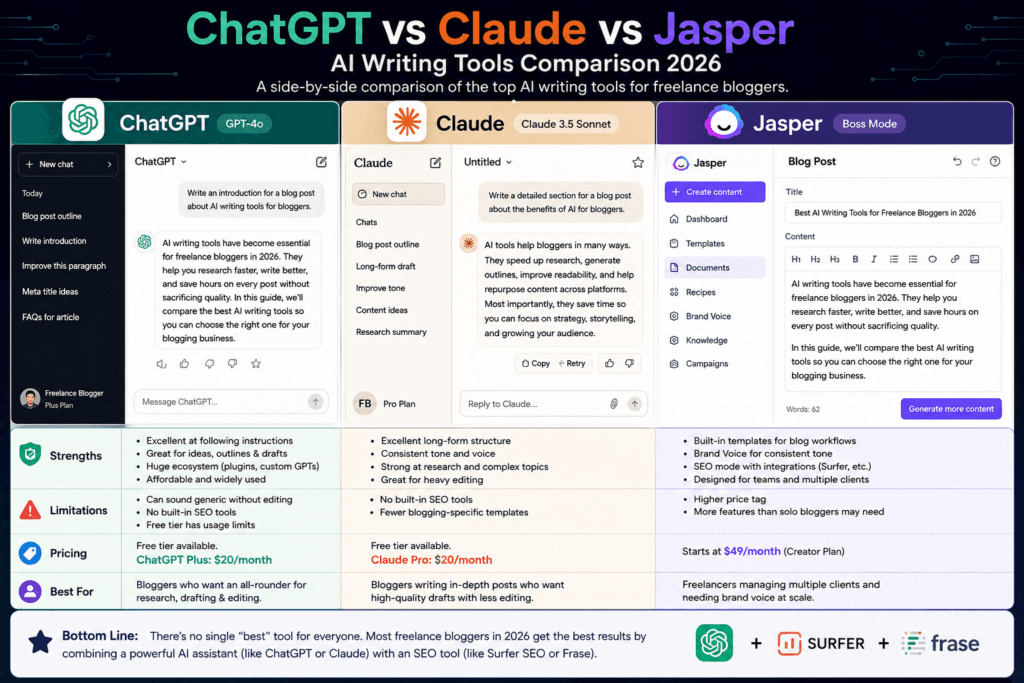
Best AI writing tools for bloggers in 2026 If you write blog posts for a living, you already know the math doesn’t work in your favor. A well-researched, well-edited post takes hours. Clients and editors want more posts, not fewer. And every other freelance blogger is using AI to close that gap, which means “I don’t use AI” is no longer a badge of honor—it’s a competitive disadvantage. This guide covers the AI writing tools that actually hold up for freelance bloggers in 2026, not just the ones with the biggest marketing budgets. We’ll cover what each tool does well, where it falls short, what it costs, and — most importantly — who should actually use it.
Disclosure: Some links in this article may be affiliate links, meaning we may earn a small commission if you sign up through them, at no extra cost to you. This never affects which tools we recommend.
Best AI Writing Tools for Bloggers in 2026 Quick Answer
For most freelance bloggers, a general-purpose AI assistant like ChatGPT Plus or Claude Pro (both around $20/month) covers research, outlining, and drafting better than most dedicated “blog writer” tools. If you write content that needs to rank in Google search, pair that with an SEO optimization tool like Surfer SEO or Frase. If you’re producing high volume for multiple clients and need consistent brand voice across accounts, Jasper is worth the higher price tag. Budget-conscious writers can get surprisingly far with Rytr.
No single tool does everything well. The bloggers getting the most value out of AI in 2026 are the ones combining two tools, not the ones searching for one tool to replace their whole workflow.
How We Evaluated These Tools
Before ranking anything, it’s worth being upfront about what “best” means here. We looked at five things:
- Output quality — does the draft sound like a person, or does it read like every other AI-generated post you’ve scrolled past?
- Editing effort — how much rewriting does a freelancer actually have to do before this is publishable?
- SEO usefulness — does it help the post rank, or does it just produce words?
- Price relative to what a solo freelancer earns per post—a $399/month tool doesn’t make sense if you’re billing $150 a post.
- Workflow fit — does it slot into how bloggers actually work (drafting in Google Docs, WordPress, or a CMS), or does it force you into its own clunky editor?
Pricing below is accurate as of mid-2026 based on each company’s published pricing pages, but AI tool pricing changes often — always confirm current rates on the official site before subscribing.
How to Use AI Tools for Blogging Without Hurting SEO (2026 Guide)
1. ChatGPT Plus — Best All-Around Value
Who can use it: Bloggers who want one flexible tool for research, outlining, drafting, and editing.
ChatGPT remains the most widely used AI writing tool among freelance bloggers, and for good reason. It’s fast, it’s good at following detailed instructions, and it handles nearly every stage of the writing process—brainstorming titles, building outlines, drafting sections, and rewriting awkward paragraphs.
Strengths:
- Excellent at following detailed style and formatting instructions
- Strong at brainstorming angles, headlines, and outlines quickly
- Broad plugin and custom GPT ecosystem for repeatable workflows
- Affordable relative to dedicated “blog writer” platforms
Limitations:
- Left unedited, output can sound generic and needs a real editing pass
- No built-in SEO scoring — you’ll need a separate tool for that
- Free tier hits usage limits fast for anyone writing daily
Pricing: Free tier available with usage limits. ChatGPT Plus is $20/month.
Who should avoid it: Bloggers who specifically need built-in SEO content scoring or SERP analysis baked into the writing tool itself — you’ll need to pair ChatGPT with something else for that.
Visit ChatGPT Site
2. Claude Pro — Best for Long-Form Structure and Voice
Who can use it: Bloggers writing longer, more detailed posts who want output that requires less rewriting.
Claude has built a strong reputation among writers specifically because its long-form output tends to need less cleanup. It’s noticeably better at maintaining structure and argument across a long post instead of drifting into repetitive filler, and it’s good at holding onto a specific tone or voice across an entire draft when you give it clear examples to work from.
Strengths:
- Handles long-form structure well without losing the thread
- Good at maintaining a consistent voice when given writing samples
- Strong at research synthesis and following nuanced instructions
- Useful for both drafting and heavy editing passes on existing content
Limitations:
- No built-in SEO tools — same gap as ChatGPT
- Fewer blogging-specific templates than tools built specifically for marketers
Pricing: Free tier available. Claude Pro is $20/month.
Who should avoid it: Bloggers who want pre-built blog templates and one-click SEO scoring in the same interface. Claude is a strong writing partner, not a packaged blogging suite.
Visit Claude.ai site.
3. Jasper — Best for Brand Voice at Scale
Who can use it: Freelancers juggling multiple clients who each need a distinct, consistent voice.
Jasper has positioned itself less as a general writing tool and more as a marketing content platform. Its standout feature for freelance bloggers is brand voice—you train it on a client’s existing content, and it applies that tone consistently across new posts. If you write for three or four clients with very different styles, that’s genuinely useful.
Strengths:
- Brand Voice training keeps client tone consistent across a body of work
- Long-form editor built specifically for articles, not just short copy
- Supports multiple underlying AI models
Limitations:
- Meaningfully more expensive than general-purpose assistants
- Aimed more at marketing teams than solo bloggers, and it shows in the interface
- Adding SEO optimization on top (via Surfer SEO integration) means another subscription
Pricing: The Pro plan runs around $59/month billed annually (about $69/month billed monthly). Business pricing is custom and aimed at teams, typically starting several hundred dollars a month.
Who should avoid it: Bloggers writing for a single publication or their own site, where brand voice training across multiple clients isn’t a real need. At this price, general-purpose tools deliver similar quality for less.
Visit Jasper.ai site.
4. Surfer SEO — Best for Ranking-Focused Content
Who can USE It: Bloggers whose income depends on organic search traffic.
Surfer isn’t primarily a writing tool—it’s an optimization tool that tells you what a post needs to compete for a given keyword: target word count, related terms competitors are using, heading structure, and more. Its content editor gives you a live score as you write or paste in a draft, which is genuinely useful for freelancers who get briefs with a target keyword attached.
Strengths:
- Real-time content scoring against what’s already ranking
- Works inside Google Docs via a Chrome extension, so it fits an existing workflow
- Useful for SEO-focused clients who expect data-backed content
Limitations:
- Not a drafting tool on its own — pair it with ChatGPT, Claude, or another writer
- Credit-based plans mean unused capacity can expire monthly
- Pricier than most bloggers expect for what is essentially an optimization layer
Pricing: Entry plans run roughly $79–$99/month (lower with annual billing), with higher tiers for more content volume and AI search visibility tracking.
Who should avoid it: Bloggers writing personal essays, opinion pieces, or content that isn’t trying to rank for competitive search terms. Surfer’s whole value proposition is SEO, so it’s wasted spend outside that use case.
Visit Surfer SEO Site
5. Frase—Best Budget SEO Companion
Who can use it: Freelancers who want SEO research and optimization without Surfer’s price tag.
Frase covers similar ground to Surfer—competitor research, content briefs, and optimization scoring—at a noticeably lower entry price. It’s a reasonable middle ground for bloggers who want data-backed briefs but aren’t ready to commit to a pricier platform.
Strengths:
- Generates content briefs from top-ranking competitor pages
- More affordable entry point than Surfer SEO
- Useful for outlining before you start drafting, not just scoring after
Limitations:
- Writing features are weaker than dedicated drafting tools like ChatGPT or Claude
- Document caps on lower-tier plans limit how many briefs you can run per month
Pricing: Plans start at roughly $15/month, though document limits are lower at that tier.
Who should avoid it: Bloggers who need heavy-duty drafting help—use Frase for research and briefs, then draft elsewhere.
Visit Frasa.in site.
6. Rytr — Best on a Tight Budget
Who can use it: New freelance bloggers who aren’t ready to commit to a $20+/month tool.
Rytr won’t out-write ChatGPT or Claude on a long, nuanced post, but for short-form sections, intros, and quick drafts, it punches well above its price. It’s a reasonable starting point if you’re testing whether AI-assisted writing fits your workflow before spending more.
Strengths:
- One of the cheapest paid AI writing tools available
- Decent for short-form content, intros, and social copy alongside blog work
- Simple, low-learning-curve interface
Limitations:
- Struggles more than premium tools on long, structurally complex posts
- Fewer research and SEO features than dedicated tools
Pricing: Paid plans start at around $9/month.
Who should avoid it: Bloggers producing long, research-heavy features where structure and depth matter—the gap in quality becomes more obvious at that length.
Visit Rytr.me site.
Comparison at a Glance
| Tool | Best For | Starting Price | Built-in SEO Scoring |
|---|---|---|---|
| ChatGPT Plus | All-around drafting and research | $20/month | No |
| Claude Pro | Long-form structure and voice | $20/month | No |
| Jasper | Multi-client brand voice | ~$59/month | Via integration |
| Surfer SEO | Ranking-focused optimization | ~$79–99/month | Yes |
| Frase | Budget SEO research and briefs | ~$15/month | Yes |
| Rytr | Short-form on a tight budget | ~$9/month | No |
Who Should Use Which Combination
- Just starting out, tight budget: Rytr or the free tiers of ChatGPT/Claude, plus manual keyword research.
- Writing for your own blog, focused on growth: ChatGPT Plus or Claude Pro for drafting, paired with Frase for briefs and optimization.
- Freelancing for SEO-focused clients: Claude Pro or ChatGPT Plus for drafting and Surfer SEO for scoring against client briefs.
- Juggling multiple client accounts with different voices: Jasper, despite the higher price, earns its keep here.
Common Mistakes Bloggers Make With AI Tools
Publishing the first draft. Every tool on this list produces a starting point, not a finished post. Editing for accuracy, adding your own examples, and cutting generic phrasing is still the freelancer’s job — and it’s usually what clients are actually paying for.
Paying for an SEO platform before you need one. If you’re not yet writing for keyword-driven briefs, a $79–$99/month optimization tool is money better spent elsewhere. Add it once ranking-focused work becomes a real part of your income.
Ignoring fact-checking. AI tools can state incorrect information confidently, especially around pricing, statistics, and recent events. Verify anything specific before it goes in front of a client or reader.
Using one tool for everything. The most efficient freelance workflows in 2026 tend to combine a general drafting assistant with a narrower, purpose-built tool — not one tool trying to do it all.
Frequently Asked Questions
Do I still need to edit AI-written blog posts? Yes. Every tool in this guide produces a draft that needs a human editing pass — for accuracy, voice, and the specific examples that make a post actually useful to readers.
Which AI writing tool sounds the least like AI? Claude and ChatGPT, when given clear voice examples and specific instructions, tend to require the least editing to sound natural. Generic prompts on any tool will produce generic, obviously AI-sounding output.
Can I use AI writing tools for client work without disclosing it? That depends entirely on your contract with each client. Some clients are fine with AI-assisted drafting as long as the final quality bar is met; others require disclosure or prohibit it outright. Always check your agreement.
Is it worth paying for both a writing tool and an SEO tool? If organic search traffic drives your income or your clients’ income, yes — the two solve different problems. A writing tool drafts, and an SEO tool tells you whether that draft can actually compete for the keyword you’re targeting.
What’s the cheapest way to start using AI for blogging? Start with the free tiers of ChatGPT or Claude. They’re capable enough to test whether AI-assisted writing fits your workflow before you commit to a paid plan.
Will AI writing tools replace freelance bloggers? Unlikely in the near term. Clients increasingly want the judgment, original reporting, and fact-checking a human brings—AI speeds up the mechanical parts of writing, but it doesn’t replace the editorial decisions that make a post worth reading.
Conclusion
There’s no single “best” AI writing tool for bloggers—it depends on what you write, who you write it for, and how much of your monthly income you’re willing to put toward tools. For most freelancers, a general-purpose assistant like ChatGPT Plus or Claude Pro covers 80% of the job at $20 a month. Add a dedicated SEO tool only once ranking-focused work is a real, recurring part of your income, and consider Jasper only if you’re managing distinct voices across multiple clients. Whatever you choose, treat these tools as a first draft generator, not a replacement for your editorial judgment. The freelancers doing well with AI in 2026 are the ones using it to write faster — not the ones publishing whatever it hands them.
