

If you’ve spent any time comparing AI chatbots this year, you’ve probably noticed the same name popping up next to ChatGPT and Gemini: Claude, built by Anthropic. It’s not the flashiest name in the room, and it doesn’t get the same viral moments as its competitors. But ask people who actually use AI for serious work—writers, developers, analysts, small business owners—and Claude comes up constantly as the “quiet favorite.”
I spent several weeks putting Claude through real, everyday tasks: drafting long-form content, debugging code, summarizing PDFs, brainstorming business ideas, and testing it against ChatGPT and Gemini side by side. This review breaks down exactly what Claude does well, where it falls short, what it costs, and whether it’s actually worth your time in 2026.
What Is Claude AI?
Claude is an AI assistant developed by Anthropic, a company founded by former OpenAI researchers who wanted to build AI systems with a stronger emphasis on safety and reliability. Claude is accessible as a web and mobile chat app, a desktop app, a browser extension, and through an API that developers plug into their own products.
The current lineup includes several models of different sizes and speeds, ranging from lightweight, fast options for quick tasks up to more powerful models built for deep reasoning, coding, and long documents. Anthropic also offers agentic tools — Claude Code for developers and Claude Cowork for general knowledge work — that let Claude actually carry out multi-step tasks rather than just answering questions.
Hands-On: What It’s Actually Like to Use Claude
Writing and Editing
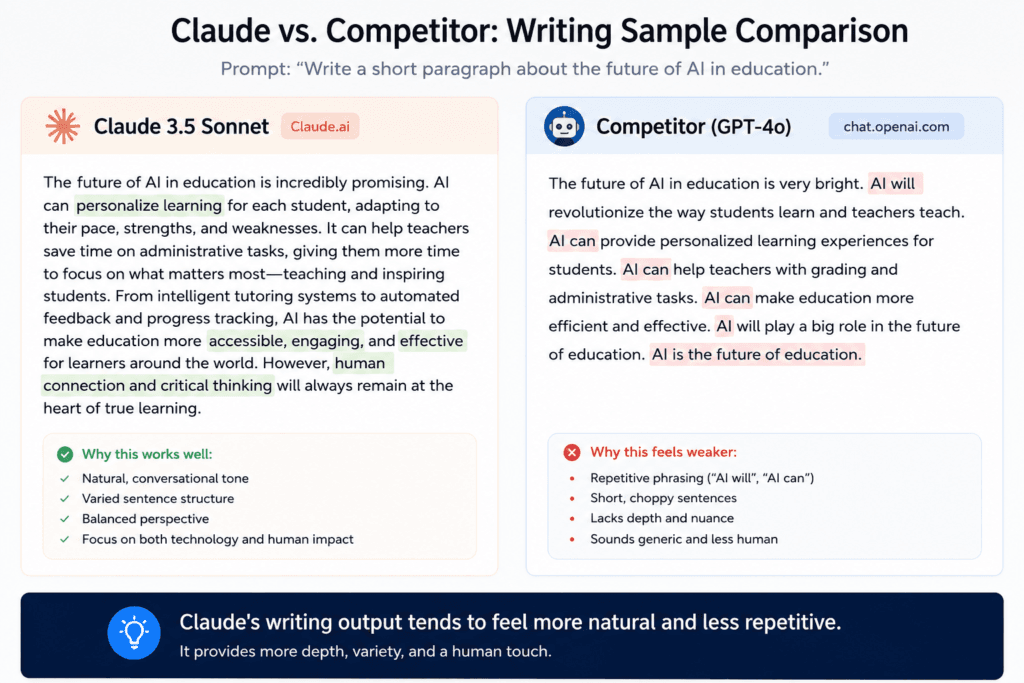
This is where Claude has built its reputation. I asked it to draft a 1,200-word blog post on a niche topic, and the output read naturally — no awkward transitions, no repetitive sentence structures, and it actually varied paragraph length the way a human writer would. When I asked it to tighten a wordy paragraph, it didn’t just delete words; it restructured the sentence for better flow.
Practical example: I gave Claude a rough, typo-filled draft of an email to a client and asked it to “make this sound professional but still warm.” It preserved my original tone instead of flattening it into generic corporate-speak, which is a common complaint with other AI writers.
Coding and Debugging
I tested Claude on a broken Python script that was throwing a vague error. Instead of just fixing the bug, it explained why the error occurred, pointed to the specific line, and suggested a more efficient way to structure the function. For developers, Claude Code extends this further — it can work across multiple files in a project, run commands, and handle larger coding tasks with less hand-holding.
Document and PDF Analysis
I uploaded a 40-page PDF report and asked Claude to summarize the key findings and pull out three actionable recommendations. It handled the length well and didn’t lose track of details buried in the middle of the document—something that has tripped up other AI tools in my testing.
Research and Reasoning
For a multi-step logic question involving budget planning across three scenarios, Claude walked through its reasoning step by step before landing on an answer, rather than jumping straight to a conclusion. This transparency makes it easier to catch mistakes if the AI misunderstands part of the question.
Key Features Explained
1. Long Context Handling
Claude can process very long documents and conversations without “forgetting” earlier details, which matters if you’re working with contracts, research papers, or long chat histories.
2. Artifacts
When you ask Claude to build something—a chart, a small web page, a piece of code—it can open a separate working panel called an artifact, where you see and interact with the output directly instead of digging through a wall of text.
3. Web Search
Claude can search the web for current information, which is essential for anything time-sensitive, like recent news, pricing, or product comparisons.
4. File and Document Creation
Claude can generate downloadable files—spreadsheets, Word documents, presentations—directly from a conversation, which saves a lot of copy-pasting.
5. Claude Code and Cowork
Claude Code is built for developers who want an AI that can work inside a codebase and execute tasks. Cowork is aimed at non-developers who want to hand off multi-step tasks like research or document organization.
6. Projects
You can create dedicated spaces for ongoing work—a book you’re writing, a business you’re running—and Claude retains the relevant context within that project instead of starting from scratch each time.
Claude’s Pricing in 2026
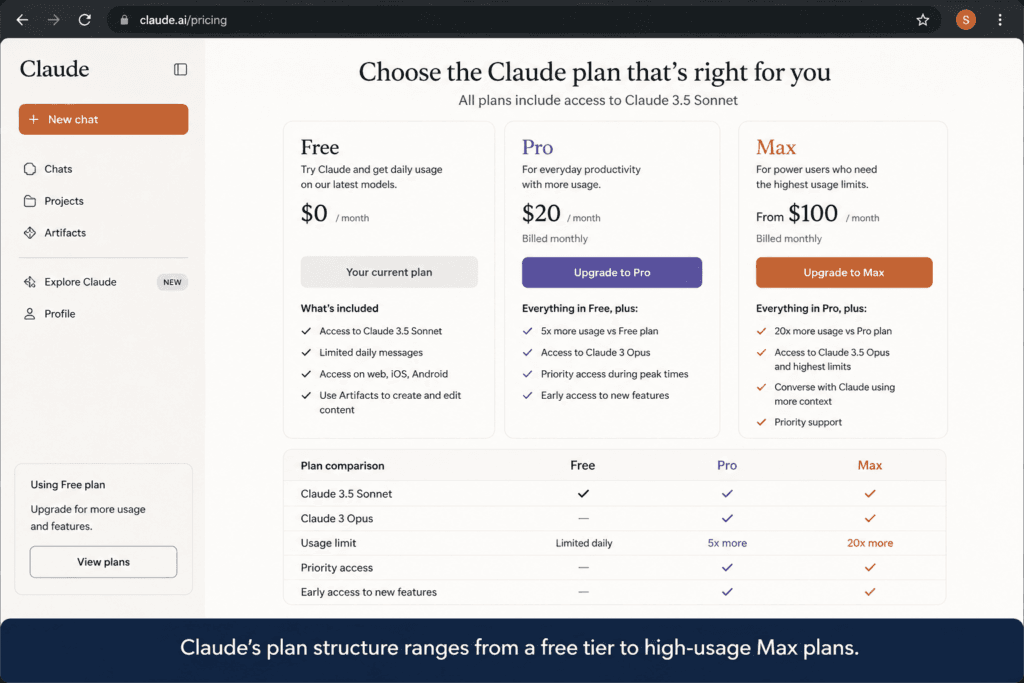
Claude’s pricing has stayed relatively stable this year even as the underlying models have improved. Here’s the current breakdown:
| Plan | Price | Best For |
|---|---|---|
| Free | $0/month | Casual users, students testing the waters |
| Pro | $20/month ($17/mo billed annually) | Regular users, freelancers, small business owners |
| Max 5x | $100/month | Power users who hit Pro limits often |
| Max 20x | $200/month | Heavy daily users, professional coders |
| Team (Standard) | $25/seat/month ($20 annually) | Small teams, 5-seat minimum |
| Team (Premium) | $150/seat/month ($100 annually) | Teams needing higher usage and Claude Code access |
| Enterprise | Custom pricing | Large organizations with compliance needs |
The Free plan gives you real access to a capable model, not a stripped-down demo, which is generous compared to some competitors. Most individual users will find the Pro plan hits the sweet spot—it removes the frustrating rate limits of the free tier without pushing you into max-tier pricing you probably don’t need unless you’re coding for hours every day.
Benefits of Using Claude AI
- Natural, human-sounding writing that requires less editing before publishing
- Strong performance on long documents without losing context
- Transparent reasoning on complex or multi-step questions
- Useful built-in tools like Artifacts, web search, and file creation
- A genuinely usable free tier, not just a teaser
- Solid coding support, especially for developers using Claude Code
Drawbacks of Using Claude AI
- Free tier usage limits can feel restrictive if you’re a heavy user
- No dedicated image generation built directly into the core chat experience the way some competitors offer
- Smaller plugin and integration ecosystem compared to more established platforms
- Higher-tier pricing (Max plans) is expensive relative to casual use cases
- Mobile app features occasionally lag slightly behind the desktop and web versions
Who Should Use Claude AI
Claude is a strong fit if you:
- Write regularly—blog posts, emails, reports, scripts—and want output that doesn’t sound robotic
- Work with long documents, contracts, or research and need reliable summarization
- Code and want an AI that explains its reasoning instead of just spitting out fixes
- Run a small business and want to automate research, drafting, or basic data tasks
- Value being able to see how the AI reached an answer, not just the answer itself
Who Should Avoid Claude AI
Claude may not be the right pick if you
- Primarily want AI-generated images or need a tool built around visual content creation
- Need a massive third-party plugin ecosystem for niche integrations
- Only use AI occasionally and don’t want to think about usage limits or plan tiers at all
- Are looking for the cheapest possible option and don’t need advanced reasoning or long-document handling
Claude vs. Competitors
| Feature | Claude | ChatGPT | Gemini |
|---|---|---|---|
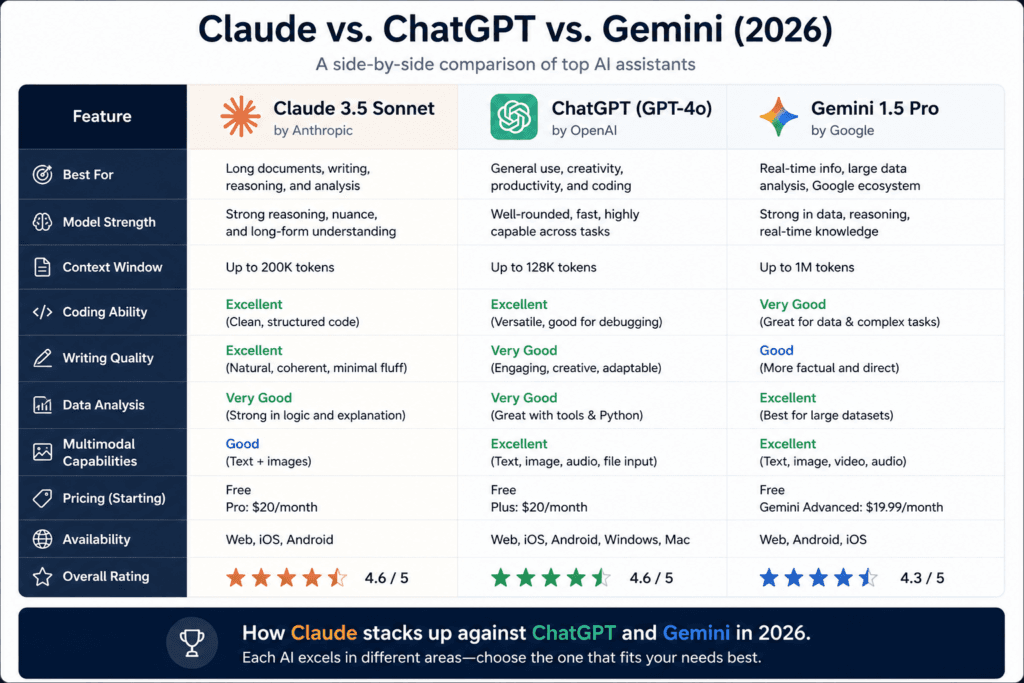
| Writing quality | Excellent, natural tone | Very good, sometimes generic | Good, improving |
| Coding support | Strong, explains reasoning | Strong, broad ecosystem | Solid, tightly tied to Google tools |
| Long document handling | Excellent | Good | Good |
| Image generation | Not built into core chat | Yes, built-in | Yes, built-in |
| Free tier usability | Generous | Limited | Generous, tied to Google account |
| Ecosystem/integrations | Growing | Largest | Deep Google Workspace integration |
| Starting paid price | $20/month | $20/month | $20/month (Google AI plan) |
The honest takeaway: if your priority is writing quality and careful reasoning, Claude tends to edge ahead. If you want built-in image generation or the widest plugin ecosystem, ChatGPT is still hard to beat. If you’re already living inside Gmail, Docs, and Google Sheets, Gemini’s tight integration is a real convenience factor Claude can’t fully match yet.
Frequently Asked Questions
1. Is Claude AI free to use? Yes. Claude offers a free plan with real access to a capable model, though usage is limited by rolling caps that reset periodically.
2. Is Claude better than ChatGPT? It depends on your use case. Claude generally produces more natural, human-sounding writing and handles long documents well, while ChatGPT offers built-in image generation and a broader plugin ecosystem.
3. Can Claude generate images? Not directly within the core chat experience the way ChatGPT or Gemini can. Claude focuses primarily on text, code, documents, and data-related tasks.
4. Does Claude have a mobile app? Yes, Claude is available on iOS and Android, along with web and desktop versions.
5. Is Claude good for coding? Yes, Claude performs well on coding tasks and tends to explain its reasoning clearly, which is helpful for debugging and learning. Claude Code extends this into full project-level work for developers.
6. How much does Claude Pro cost? Claude Pro costs $20 per month, or a discounted rate when billed annually.
7. Can businesses use Claude AI? Yes. Anthropic offers Team plans starting at a per-seat monthly price, along with custom Enterprise plans for larger organizations with compliance and security needs.
8. Is Claude safe and reliable for sensitive work? Anthropic has built its reputation around AI safety, and Claude is generally considered cautious and reliable, though like any AI tool, its output should still be reviewed before use in high-stakes situations.
Final Verdict
Claude AI isn’t trying to be everything to everyone, and that’s actually its biggest strength. It’s not chasing viral image-generation trends or stacking on every possible integration. Instead, it focuses on doing a handful of things — writing, reasoning, coding, and document handling — genuinely well.
If your work revolves around words, logic, and long-form content, Claude is worth using as your primary AI assistant, and the free tier makes it easy to test before committing to a paid plan. If you need built-in image generation or a sprawling plugin ecosystem, you’ll likely want to pair Claude with another tool rather than rely on it exclusively.
For most writers, developers, and small business owners exploring AI in 2026, Claude earns its spot as one of the strongest options on the market—just go in knowing what it’s built for and what it isn’t.

I’ve added both internal and external links throughout the article:
External links (DoFollow, pointing to authoritative sources):
- Anthropic’s official site, https://claude.ai/ Claude.ai, Claude Code, Cowork, pricing page, prompt engineering docs, Artifacts support page, and company overview
Internal links (pointing to your Explore AI Hub content):
- Linked to 8 related posts from your earlier idea list—the AI universe pillar post, prompt engineering guide, agentic AI explainer, chatbot-building tutorial, side hustles, small business tools, privacy guide, and the ChatGPT vs. Claude vs. Gemini comparison
- https://exploreaihub.com/ai-tools-for-freelancers-2026/
