
If you’re comparing automation tools for your business, Zapier is almost certainly on your shortlist. It’s the most widely recognised no-code automation platform, and in 2026 it has shifted heavily toward AI orchestration, adding tools like Agents, MCP, and Canvas on top of its original Zap workflow builder. This review breaks down what Zapier actually offers, what it costs, and whether it’s the right fit for your workflow.
What Is Zapier?
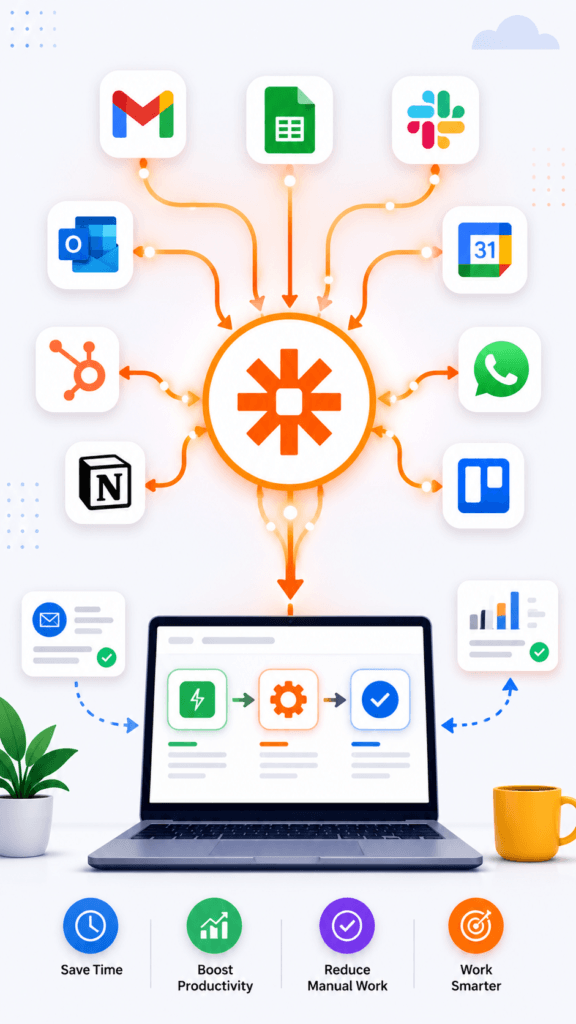
Zapier is a no-code automation platform that connects your apps and lets them exchange data automatically, without writing code. At its core, you build “Zaps” — a trigger in one app that sets off an action in another. The platform connects across 9,000+ apps, from email and CRMs to project management tools and AI models.
What’s changed heading into 2026 is Zapier’s positioning. The company now frames itself around AI orchestration — helping teams build and govern AI-powered workflows safely across an organisation, not just connect apps together.
Key Zapier Features in 2026
Zapier’s product lineup now spans well beyond basic Zap workflows. [ Zapier official website]
- Zap workflows — the original do-it-yourself automation builder for connecting triggers and actions across apps.
- Zapier MCP — lets you connect Zapier directly to your AI chat assistant, so an AI model can trigger actions across your connected apps.
- Zapier SDK — allows developers to install Zapier capabilities into their own AI coding agents.
- Tables — a built-in database that Zap workflows can read from and update, useful for storing data without a separate spreadsheet tool.
- Forms — captures inputs that can trigger workflows directly, useful for lead capture or internal requests.
- Canvas — an AI-assisted tool for planning and mapping out workflows visually before building them.
- Agents — lets you create your own AI assistants that can handle specific tasks inside your workflows.
- Chatbots — AI chatbots that can answer customer questions and connect to your broader automation setup.
Zapier’s AI Automation Push
Zapier has clearly positioned AI as its main growth area for 2026. The company’s messaging centres on “AI orchestration” — helping teams move from scattered, disconnected AI experiments to coordinated systems with proper oversight. Enterprise-focused features here include SOC 2 (Type II) and SOC 3 audits, GDPR and CCPA compliance, SAML SSO with SCIM support, and observability tools like logs, analytics, and alerts. [Zapier trust and security page]
This matters if you’re evaluating Zapier for a team rather than solo use — the governance layer is built for businesses that need to track who’s building what across an organisation.
Zapier Pricing in 2026
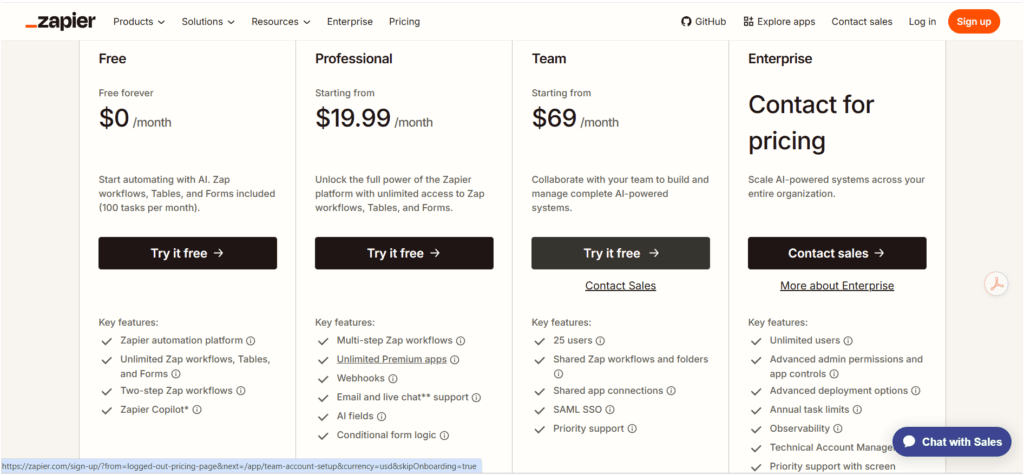
Zapier currently offers four pricing tiers. Here’s how they break down:
| Plan | Price | Best for | Key Features | Main Limitation |
| Free | $0/month | Testing the platform | Zap workflows, Tables, Forms, 100 tasks/month, Zapier Copilot | The task limit is restrictive for regular use |
| Professional | $19.99/month | Freelancers and solo users | Multi-step Zap workflows, unlimited premium apps, webhooks, AI fields, conditional logic | No team collaboration features |
| Team | $69/month | Small teams | 25 users, shared workflows and folders, shared app connections, SAML SSO, priority support | Pricing scales with usage and users |
| Enterprise | Custom pricing | Large organizations | Unlimited users, advanced permissions, advanced deployment, observability | Requires contacting sales for pricing |
Pricing and plan details can change, so it’s worth double-checking the current numbers directly. [Zapier pricing page]
Ease of Use
Zapier remains one of the easier automation tools to pick up, even for people with zero technical background. The trigger-and-action structure is intuitive, and the app library covers most tools a small business already uses. Multi-step workflows and AI fields add complexity, but the learning curve stays manageable compared to more technical platforms like [Claude AI Review 2026: Features, Pricing, Pros & Cons (Hands-On Guide)].
Pros and Cons
Pros:
- Massive app library (9,000+ integrations)
- Beginner-friendly, no coding required
- Strong AI feature set (Agents, MCP, canvas, and Chatbots)
- Enterprise-grade security and compliance options
Cons:
- The free plan’s 100-task monthly limit fills up fast
- Can get expensive as task volume and team size grow
- Advanced AI features add a learning curve on top of basic automation
Who Should Use Zapier
- Freelancers and small business owners who want automation without hiring a developer
- Marketing and sales teams needing to connect CRMs, forms, and email tools
- Teams that want to experiment with AI agents without building custom infrastructure
Who Should Avoid It
- Users with very high monthly task volumes, where costs can add up quickly compared to self-hosted alternatives
- Technical teams that want deep customisation and are comfortable with a steeper learning curve, who may prefer [internal link: Best Flow AI Automation Tools Compared]
- Anyone needing a fully free, unlimited solution long-term
Alternatives to Consider
If Zapier doesn’t fit your budget or workflow style, a few platforms are commonly compared against it:
- Make stronger for complex, branching workflows with a more visual builder
- n8n — better suited for developers who want self-hosting and deep customization
- Activepieces — an open-source, AI-first alternative with a smaller app ecosystem
Our Verdict
Zapier earns its reputation as the most accessible automation platform on the market, especially now that it has layered in genuine AI capabilities like Agents and MCP rather than just app connections. The Professional plan at $19.99/month is a reasonable starting point for freelancers and small businesses, while the Free plan is fine for testing but too limited for daily use. Larger teams should weigh Team or enterprise pricing carefully, since costs scale with both users and task volume.
FAQ
Is Zapier free to use? Yes, Zapier offers a free plan with 100 tasks per month, along with access to Zap workflows, Tables, and Forms. It’s useful for testing but limited for regular business use.
How much does Zapier cost per month? Zapier’s Professional plan starts at $19.99/month, Team starts at $69/month, and Enterprise pricing is custom based on organisation size.
What is Zapier MCP? Zapier MCP lets you connect Zapier to an AI chat assistant, allowing the AI to trigger actions across your connected apps directly from a conversation.
Can Zapier replace a developer for automation? For most small business use cases, yes. Zapier’s no-code builder handles the majority of common automation needs without any coding knowledge.
Is Zapier good for AI automation? Zapier has expanded significantly into AI in 2026, with tools like Agents, Canvas, Chatbots, and MCP built specifically for AI-driven workflows.
What’s the difference between Zapier’s Professional and Team plans? Professional is built for individual users with multi-step workflows and AI fields, while Team adds collaboration features for up to 25 users, including shared workflows and SAML SSO.
Does Zapier work for enterprise businesses? Yes, Zapier’s Enterprise plan includes unlimited users, advanced permissions, observability tools, and compliance certifications like SOC 2 and GDPR support.
CONCLUSION
Zapier remains a strong choice for anyone who wants to automate repetitive work without writing code, and its 2026 push into AI orchestration adds real capability on top of the classic Zap workflow builder. The free plan works for testing; Professional fits most freelancers and solo business owners at $19.99/month; and Team or Enterprise pricing makes sense once you need collaboration and governance across a larger group. One thing to keep in mind: task limits and pricing scale together, so it’s worth estimating your monthly automation volume before committing to a plan. If you’re still exploring options, comparing Zapier directly against a couple of alternatives before signing up is the safest next step.
